

There are two components on the Management Workstation
The airctl program and its associated services on the management host (as described in the [Architecture Overview](/PEC/architecture-overview#Edge Stack Architecture Overiew) section)
The Management Server (the VM running the Platform9 management host).
Airctl and Services
As described in the architecture section, the management workstation contains the following primary components:
Airctl
The airctl utility is the most important tool used to manage the Platform9 SMCP.
Config-file
Verify you are explicitly specifying the config file as part of the command line, or make sure the config-file is named airctl-config.yaml in the user's home directory. **
If the config-file is not present, you may see an error similar to the following output.
The config-file also contains the configuration information for each of the hosts. Some clients create a copy of config-file for each cluster and then add the nodes/hosts to the nodeHostnames list.
State-dir
The state directory is located within the user's /root/.airctl folder. It is created and is employed every time airctl runs. It also contains a backup of the configuration for the Platform9 software and hence must remain secure, so please ensure it is not deleted accidentally.
Furthermore, it is designed to run as a normal user, but for certain commands it may require root privileges, specifically, configure-localhost.
Libvirt & Qemu
Platform9 uses a VM to run the Platform9 management plane (the Management Server). Please ensure that both libvirt and qemu are installed and configured to be accessible by the user running the airctl command. This can be verified using the following commands.
Additionally, verify that libvirt is functioning normally and is accessible to the user.
Virsh Checks
The following commands list the three most important aspects of the VM.
virsh list - The name of the VM is pf9-mplane
virsh net-list - The network pf9-mplane uses is active
virsh net-dhcp-leases pf9-mplane - The IP address 192.168.120.254 is assigned to the VM
The current version of the Platform9 management plane requires kvm/qemu to run in the VM. If the underlying machine is a VM, the qemu VM created may be very slow and possibly unusable. There are methods to run a VM in a nested configuration on both OpenStack & VMware, but this may require specific configuration to expose the KVM device (in cases of OpenStack) and the Virtualization features in case of VMware to the underlying VM.
HAProxy, IPTables, IP Address & DNS
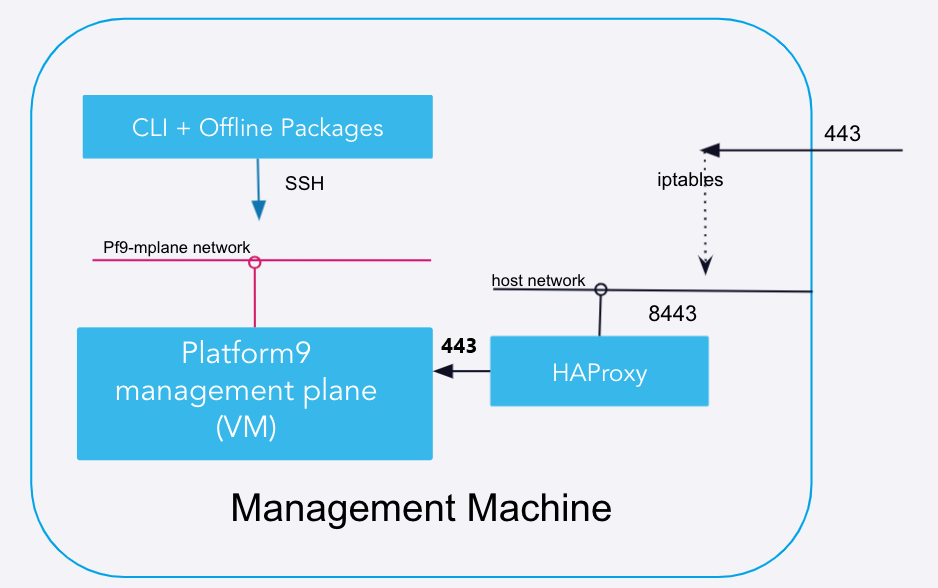
The external port 443 listens for traffic coming into the pf9-management plane. The filtered traffic is allowed based on the IPtables rules and HAProxy settings. The Platform9 management plane VM listens specifically for traffic on port 443 coming from HAProxy. The following diagram better illustrates this relationship.
HAProxy runs as a container and listens on port 8443 on the docker host network.
Pf9-management plane runs on pf9-mplane libvirt network and has port 443 and port 22 open
HAproxy transfers all the traffic from the incoming 8443 port to port 443 in the pf9-mplane
IPTables assists in getting traffic from the
externalIpconfig in the config file to the HaProxy
Review the following command to ensure the setup is correct, and the traffic is being correctly directed from the external port 443 on “externalIp” to the HaProxy.