

You are viewing documentation for a previous version of Platform9 products. For the latest Private Cloud Director documentation, click here.
Managed Kubernetes
5.14
×
Overview
Getting Started
Clusters
PMK CLI
APIs
In Cluster Monitoring
Catapult Remote Monitoring
Platform9 Managed Add-ons
Platform Administration
Workloads & Apps
Support
Title
Message
Create new category
What is the title of your new category?
Edit page index title
What is the title of the page index?
Edit category
What is the new title of your category?
Edit link
What is the new title and URL of your link?
Create ClusterRoleBinding
Summarize Page
Copy Markdown
Open in ChatGPT
Open in Claude
A ClusterRoleBinding binds users or groups of users to a ClusterRole that have been created for a cluster. Follow the steps given below to create a ClusterRole through the Platform9 Clarity UI.
- Navigate to Kubernetes > RBAC > ClusterRoleBindings.
- Click Add ClusterRoleBinding. This open a new window where details are added.
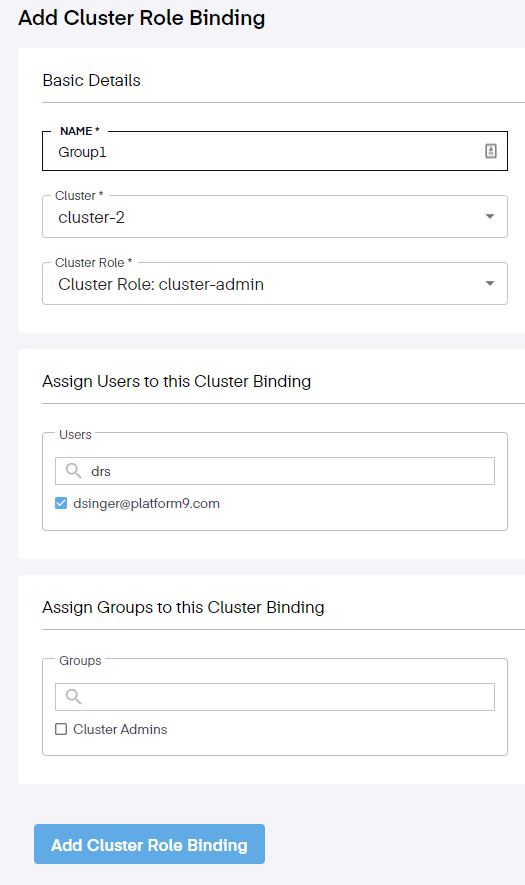
- Enter the Name for the ClusterRoleBinding.
- Select the Cluster.
- Select the Cluster Role.
- Next, search for or choose a user by ticking the checkboxes for the Users and/or Groups to which you wish to assign the Cluster Role.
- Finally, click the Add ClusterRoleBinding button.
The ClusterRoleBinding is created and is visible on the Platform9 management UI under the list of existing ClusterRoleBindings. Once a ClusterRoleBinding is created, the users or groups of users to whom the ClusterRole has been assigned can perform operations specified within the ClusterRole.
Type to search, ESC to discard
Last updated on Jan 23, 2026
Was this page helpful?
Discard Changes
Do you want to discard your current changes and overwrite with the template?
Archive Synced Block
Message
Create new Template
What is this template's title?
Delete Template
Message