

You are viewing documentation for a previous version of Platform9 products. For the latest Private Cloud Director documentation, click here.
Managed Kubernetes
5.14
×
Overview
Getting Started
Clusters
PMK CLI
APIs
In Cluster Monitoring
Catapult Remote Monitoring
Platform9 Managed Add-ons
Platform Administration
Support
Title
Message
Create new category
What is the title of your new category?
Edit page index title
What is the title of the page index?
Edit category
What is the new title of your category?
Edit link
What is the new title and URL of your link?
Namespaces
Summarize Page
Copy Markdown
Open in ChatGPT
Open in Claude
To access this page, go to the Workloads > Namespaces tab. On this page, we can select the cluster and search for a namespace. Clicking on the circular icon refreshed the page, while clicking on the gear icon allows users to select the columns best suited for their needs. Additionally, a new service can be created using the Add Namespace button. The available columns are as follows.
- Name – The designation of the namespace
- Status – This field shows the service state of the namespace
- Finalizers – Defines a namespace key that delays deletion until a specific condition is met
- Cluster – The cluster the namespace is linked to
- Created – The creation date of the namespace
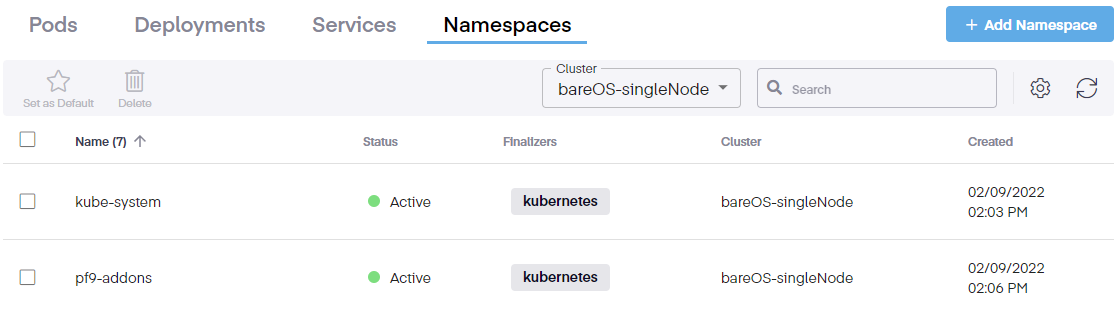
Selecting a checkbox next to a namespace allows users to set it as the default namespace or remove it.
Type to search, ESC to discard
Last updated on Jan 23, 2026
Was this page helpful?
Next to read:
ReplicaSetDiscard Changes
Do you want to discard your current changes and overwrite with the template?
Archive Synced Block
Message
Create new Template
What is this template's title?
Delete Template
Message