
Introduction
Getting Started
Infrastructure
Networks
Volumes and Snapshots
Images
Flavors
Tenant Administration
User Administration
Accessing VMs
Application Management
CLI Access
Monitoring & Alarms
Troubleshooting
Tutorials
Support
Regions
Powered By

You can remove multiple metadata key-value pairs at a time.
You must be a self-service user or an administrator to perform this operation.
To remove bulk metadata for an instance, follow the steps given below.
1. Log in to Clarity.
2. Click Instances in the left panel.
3. Select the checkbox for the instance to which you want to add metadata in bulk.
4. Click Settings on the toolbar seen above the list of instances.
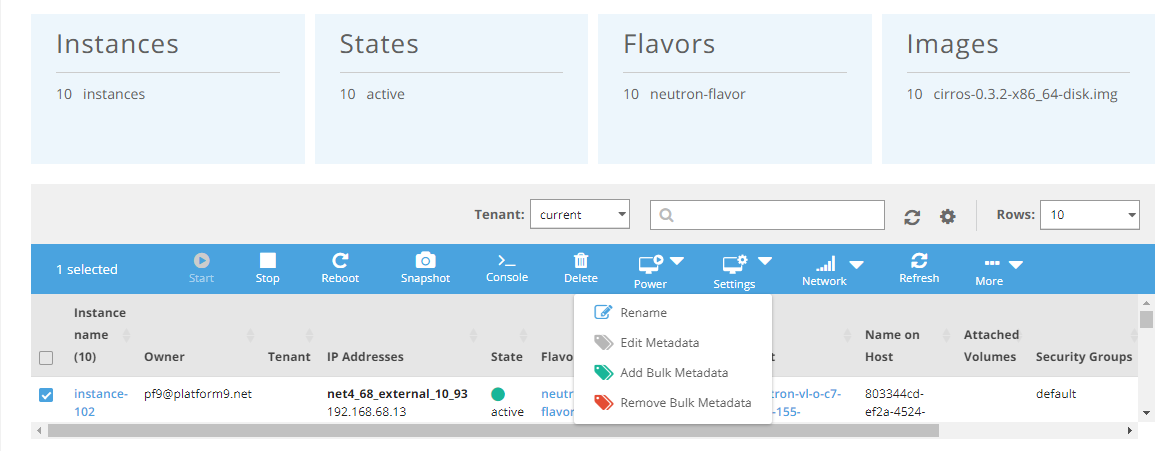
5. Click Remove Bulk Metadata.
6. Select the check boxes for the keys to be removed.
7. Click Remove Tags.
The bulk metadata is removed from the instance.
Was this page helpful?