
Problem
Changing an iSCSI Initiator Name (IQN) on a hypervisor is an inherently disruptive process. It requires modifying a configuration file and restarting critical services like iscsid and multipathd. This guide is a clear and reliable procedure to rename these iSCSI initiator names (IQN).
Environment
Private Cloud Director Virtualization - v2025.4 and Higher
Private Cloud Director Kubernetes – v2025.4 and Higher
Self-Hosted Private Cloud Director Virtualization - v2025.4 and Higher
Self-Hosted Private Cloud Director Kubernetes - v2025.4 and Higher
Component - Storage - iSCSI
Procedure
To minimise impact, it is strongly recommended to shut down all VMs on the hypervisor where you are applying the change before proceeding, starting with the least critical one.
"Enabling maintenance mode" on the hypervisor. On the left-hand side of PCD GUI, click on Infrastructure -> select Cluster Hosts -> select hypervisor -> Click on the "Other" dropdown section -> Enable maintenance mode.
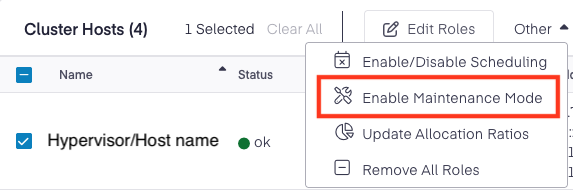
Migrate all VMs from the hypervisor to another hypervisor. It is recommended to perform cold-migration (Stop VM and perform migrate) to avoid data losses.
SSH to the hypervisor, and identify the current iSCSI Initiator Name (IQN):
This will immediately break all existing iSCSI sessions, making any attached virtual machine (VM) disks temporarily unavailable.
Update the
InitiatorNamewith the new desired IQN value and save the file.Reboot the hypervisor.
Validation
Service
pf9-ostackhostand other PF9 services should be running.Run
iscsiadm -m sessionon the host to verify new IQNHypervisor compute services should show up. Use the command given below:
Create a test VM on the hypervisor and validate if the VM build is working as expected.
